Private File Sharing Services: How Secure Transfers Work
Ephemeral transfer services isolate data by generating cryptographic keys inside your local browser runtime before any bytes reach a remote server.
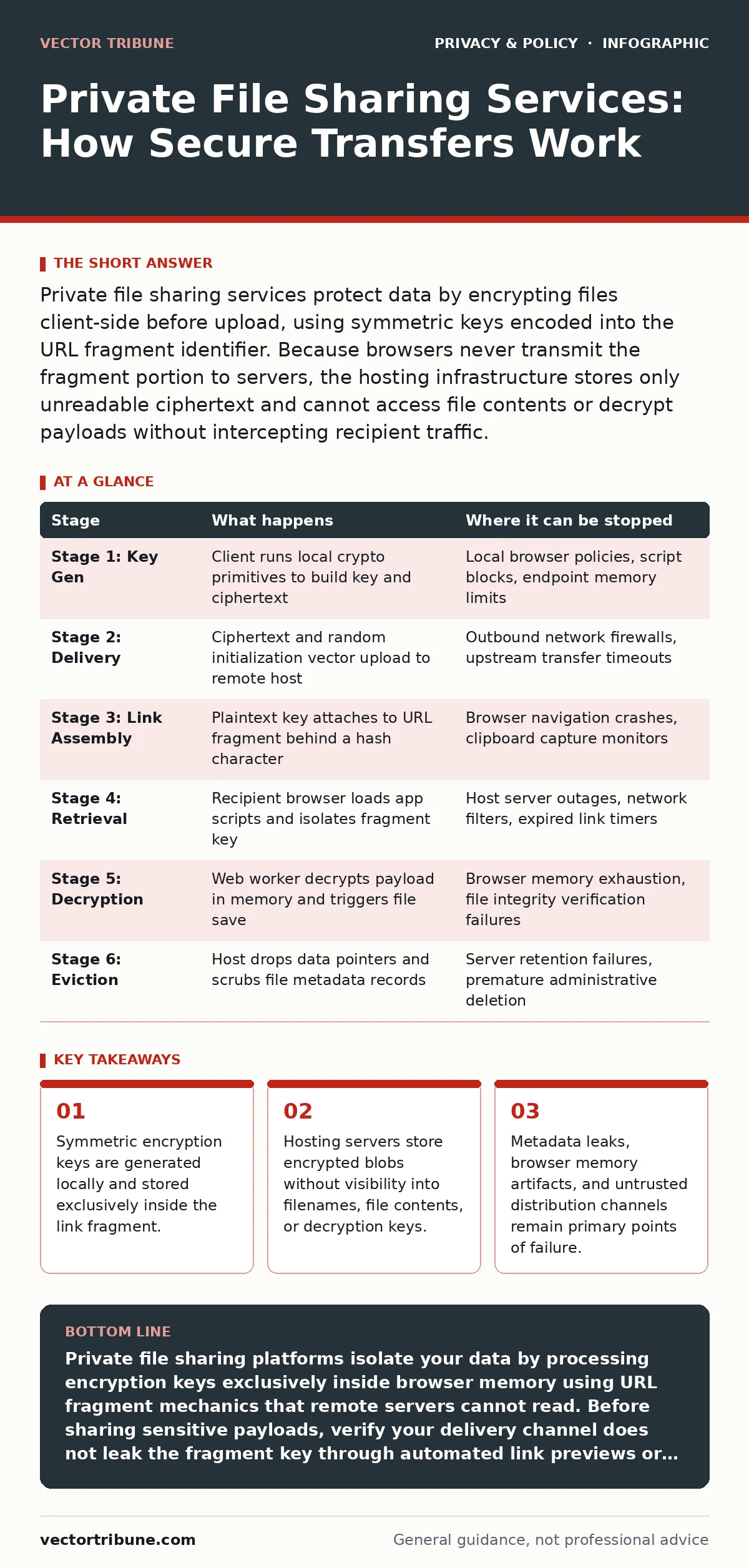
Private file sharing services protect data by encrypting files client-side before upload, using symmetric keys encoded into the URL fragment identifier. Because browsers never transmit the fragment portion to servers, the hosting infrastructure stores only unreadable ciphertext and cannot access file contents or decrypt payloads without intercepting recipient traffic.
How Client-Side Encryption Separates Data from Storage
Private file sharing relies on a zero-knowledge architecture where the host lacks the technical ability to decrypt stored objects. Standard cloud storage inspects payloads for indexing and abuse prevention, but private transfer tools run cryptography routines inside your browser sandbox before any network packets leave your system.
Client applications execute symmetric encryption, an operation where a single cryptographic key both scrambles and unscrambles data. Modern implementations use algorithms like AES-GCM (Advanced Encryption Standard in Galois/Counter Mode), which simultaneously encrypts the stream and computes an authentication tag to prevent tampering.
Network observers and server operators see only an opaque binary payload. Even if a hosting platform complies with legal discovery requests under privacy laws for small businesses, the operator can hand over only scrambled bytes. Decryption remains mathematically infeasible without the original symmetric key generated by the sender.
The Mechanics of URL Hash Fragments
Web browsers treat the pound symbol or octothorpe in a URL as an instruction to process data locally. Everything after this symbol represents a URI fragment identifier, an internal reference originally designed to jump to specific page anchors.
Web standards dictate that browsers never send fragment identifiers across the network in HTTP request headers. Private transfer platforms exploit this specification by appending the client-generated decryption key to the sharing link as a fragment.
Network servers record the base URL path containing the file identifier in access logs, but the secret key stays inside the local client context. Web workers pull the key from memory to decrypt downloaded chunks inside browser memory before writing the reconstructed file to disk.
The Lifecycle of a Private File Transfer
Stage 1: Key Generation and In-Browser Encryption
Browsers use standard cryptographic APIs to generate a random symmetric key directly on your local device. The sender selects a file, prompting the client application to read the file as an array buffer. The browser uses AES-GCM to derive ciphertext alongside an initialization vector, an arbitrary number used once to ensure identical files produce completely different encrypted outputs.
Stage 2: Payload Delivery and Server Ingestion
Senders transmit the initialization vector and ciphertext to the storage server across a standard Transport Layer Security connection. The server writes the blob to disk, assigns a unique storage identifier, and associates the record with an expiration timer. The remote host receives no plaintext metadata, meaning the real filename, extension, and file size remain shielded from administrative logging.
Stage 3: Link Assembly and Fragment Isolation
Client software constructs a link pairing the remote storage address with the local symmetric key. The interface outputs this string exclusively to the sender, ensuring the key never touches the network stack during generation. The browser marks the transfer as complete and dumps the working key from memory.
Stage 4: Retrieval and Key Parsing
Recipients open the full URL within their browser. The local browser engine loads the client application scripts from the host, parses the fragment string, and extracts the key into working memory. Meanwhile, the client script sends a retrieval query containing only the file identifier back to the storage host to pull the encrypted object.
Stage 5: In-Memory Decryption and Reconstruction
Recipients receive the raw ciphertext and the initialization vector over the network. The client script executes symmetric decryption routines, validates the integrity authentication tag, and rebuilds the original binary object inside browser memory. The browser then converts the reconstructed memory buffer into a standard local file download.
Stage 6: Ephemeral Eviction and Cryptographic Erasure
Storage servers track explicit conditions to purge stored blobs automatically. Services trigger deletion when download counters reach zero or retention timers expire. Because the host retains no decryption capability, cryptographic erasure is inherent; even if deleted storage blocks linger on un-wiped physical disks, the encrypted data remains indecipherable to anyone recovering raw media.
| Stage | What happens | Where it can be stopped |
|---|---|---|
| Stage 1: Key Gen | Client runs local crypto primitives to build key and ciphertext | Local browser policies, script blocks, endpoint memory limits |
| Stage 2: Delivery | Ciphertext and random initialization vector upload to remote host | Outbound network firewalls, upstream transfer timeouts |
| Stage 3: Link Assembly | Plaintext key attaches to URL fragment behind a hash character | Browser navigation crashes, clipboard capture monitors |
| Stage 4: Retrieval | Recipient browser loads app scripts and isolates fragment key | Host server outages, network filters, expired link timers |
| Stage 5: Decryption | Web worker decrypts payload in memory and triggers file save | Browser memory exhaustion, file integrity verification failures |
| Stage 6: Eviction | Host drops data pointers and scrubs file metadata records | Server retention failures, premature administrative deletion |
Cryptographic Limits and Architectural Trade-Offs
Browser engines enforce strict limits on memory allocations, making large file transfers prone to client-side crashes during in-memory decryption. Processing multi-gigabyte archives requires slicing files into tiny encrypted chunks, increasing processing overhead and triggering thermal throttling on mobile devices.
Client-side encryption eliminates host-side searchability and deduplication. Storage providers cannot compress identical blocks across multiple users, driving up operating overhead. Providers shift these operational costs to end users through aggressive file-size limits and brief retention windows.
Browser environments lack hardened trust boundaries compared to compiled binaries. Malicious host operators can serve modified JavaScript to a specific recipient, intercepting the fragment key right as the page executes. Users facing targeted surveillance require dedicated tools built around native end-to-end encryption rather than browser-mediated scripts.
Metadata Leakage and External Vulnerabilities
Transfer links present critical operational security trade-offs because the fragment identifier sits exposed in local application histories. If a user pastes a transfer link into a messaging client or collaborative workspace, that application may parse the full URL string to generate link previews, broadcasting the private decryption key to third-party scraping servers.
Network observers monitor transfer timing, packet volumes, and client IP addresses despite payload encryption. Organizations seeking privacy must route traffic through protective proxies or apply pseudonymization techniques to prevent intermediaries from matching file uploads to specific user identities. Transferring sensitive payloads while connected to untrusted access points exposes metadata to local network eavesdroppers, an issue detailed in analyses of public Wi-Fi risks.
Access logs capture system details, browser versions, and interaction times. Even without file contents, traffic analysis reveals which identities communicate and how frequently transfers occur. Private file sharing shields the payload, but users remain responsible for securing the communication path used to pass the link.
Verifying Service Integrity
- Confirm the browser application operates over an authenticated HTTPS connection to prevent script tampering in transit.
- Inspect the network console inside your browser developer tools to verify that upload requests contain only binary blobs, not cleartext strings or symmetric keys.
- Test the download link in a secondary, isolated browser profile to confirm the host cannot complete retrieval without the fragment identifier present.
- Review external clipboard managers and screenshot utilities to ensure transfer links are not captured and uploaded to unencrypted cloud backups.
- Validate payload integrity by matching local cryptographic hash outputs before transmission and after reception.
Key takeaways
- Symmetric encryption keys are generated locally and stored exclusively inside the link fragment.
- Hosting servers store encrypted blobs without visibility into filenames, file contents, or decryption keys.
- Metadata leaks, browser memory artifacts, and untrusted distribution channels remain primary points of failure.
Private file sharing platforms isolate your data by processing encryption keys exclusively inside browser memory using URL fragment mechanics that remote servers cannot read. Before sharing sensitive payloads, verify your delivery channel does not leak the fragment key through automated link previews or external clipboard monitors.
Frequently asked questions
Can the storage provider see my real file name?
Well-designed private sharing services encrypt the filename alongside the raw payload bytes inside the client container before upload. The hosting server registers only an arbitrary database key, meaning the host cannot see your original file name, its extension, or its contents.
What happens if a recipient loses the link fragment?
Losing the link fragment results in permanent data loss for that transfer because the hosting server never receives or stores the decryption key. Without the fragment containing the symmetric key, the stored binary blob on the server cannot be decrypted by either the host or the recipient.
Are ephemeral file transfers safe from link preview scrapers?
Link preview scrapers can compromise private transfers if the messaging platform improperly forwards full URL fragments to its preview generation servers. Senders should transmit links through channels that do not parse previews or place the link inside an encrypted chat message to prevent third parties from capturing the key.
How do these tools differ from conventional cloud storage?
Conventional cloud storage retains server-side decryption keys to index files, transcode media, and process search queries across your storage drive. Private file sharing platforms use client-side key generation to deny the server access to the data, prioritizing absolute transfer privacy over indexing features.
How this guide was produced: written by the Vector Tribune editorial team with AI assistance, checked against the public references listed below, and reviewed when the facts change. See our editorial policy or report an error.