What Is Typosquatting in the Context of DNS Attacks
Typosquatting exploits human muscle memory and DNS resolution logic to redirect traffic before any authentication or encryption takes place.
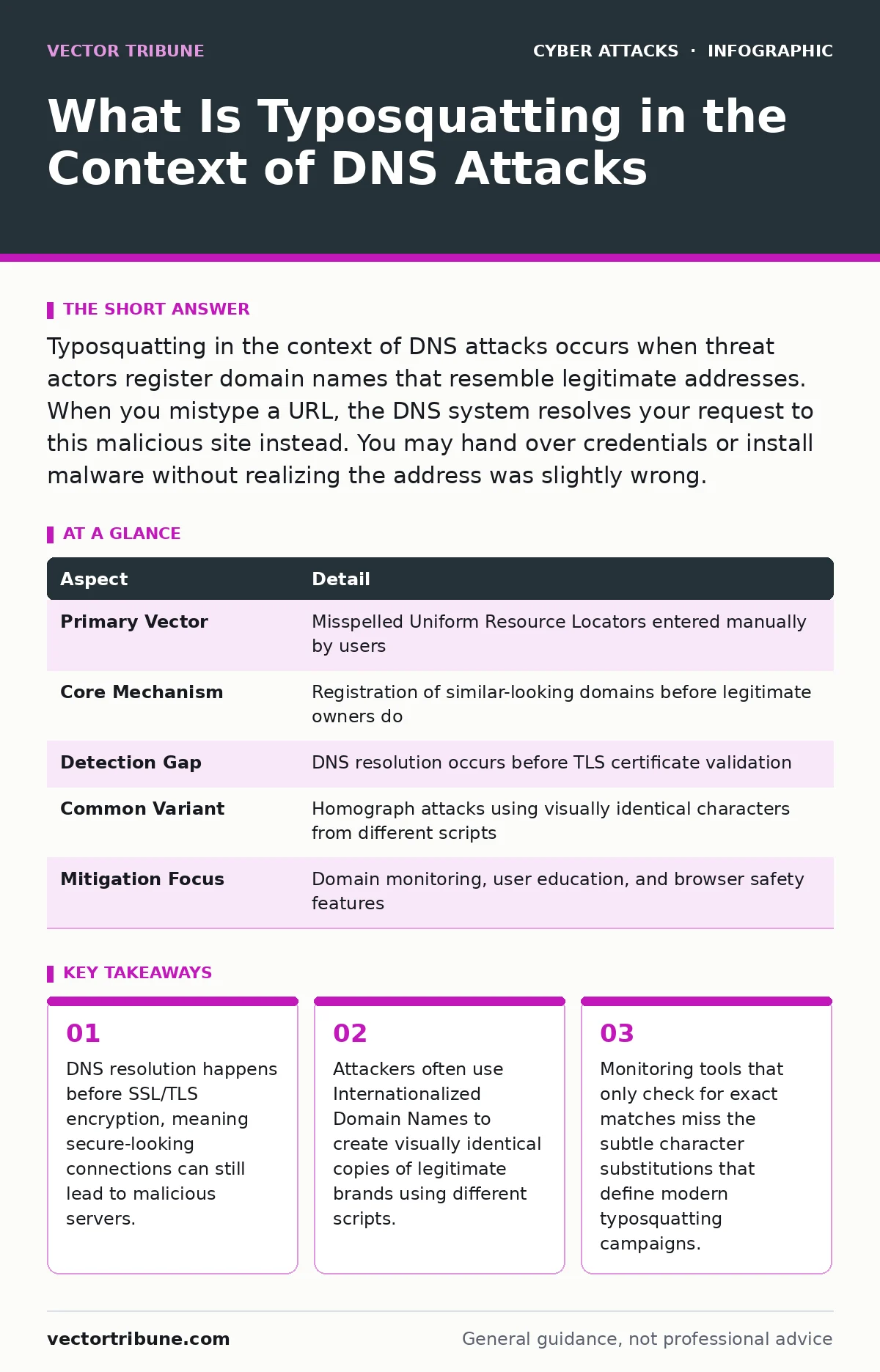
Typosquatting in the context of DNS attacks occurs when threat actors register domain names that resemble legitimate addresses. When you mistype a URL, the DNS system resolves your request to this malicious site instead. You may hand over credentials or install malware without realizing the address was slightly wrong.
Imagine typing a familiar website address into your browser. Your fingers move quickly, relying on muscle memory rather than visual confirmation. You press enter, and the page loads instantly. The layout looks correct. The logo is there. The address bar shows a lock icon. You proceed to log in, unaware that a single missing letter has rerouted you to a server owned by an adversary. This is the fundamental mechanic of typosquatting. It relies on the assumption that you will not scrutinize every character in a Uniform Resource Locator.
What Is Typosquatting in the Context of DNS Attacks
Typosquatting in the context of DNS attacks is the practice of registering domain names that are slight misspellings of popular, legitimate domains. The goal is to capture traffic from users who make typing errors. When you enter the wrong address, the Domain Name System translates that text into an IP address. The attacker controls the server at that IP address. This mechanism bypasses many traditional security controls because the request appears to be a legitimate connection to a valid domain. The attack succeeds before your browser even attempts to verify the site's identity.
The technical foundation relies on how humans process text versus how machines process it. Humans scan for patterns and familiar shapes. Machines compare characters one by one. An attacker registers a domain that differs by only one or two characters from a target. If the target is a major service provider, thousands of users might make the same common typo daily. This creates a steady stream of unsuspecting visitors. The attacker does not need to trick you with a clever email or a complex social engineering script. They simply wait for your error.
| Aspect | Detail |
|---|---|
| Primary Vector | Misspelled Uniform Resource Locators entered manually by users |
| Core Mechanism | Registration of similar-looking domains before legitimate owners do |
| Detection Gap | DNS resolution occurs before TLS certificate validation |
| Common Variant | Homograph attacks using visually identical characters from different scripts |
| Mitigation Focus | Domain monitoring, user education, and browser safety features |
How the Technical Mechanism Operates
The process begins with domain registration. Attackers use automated tools to generate lists of probable typos for high-value targets. These lists include adjacent key swaps on a keyboard, missing letters, double letters, and common phonetic substitutions. The tools then check which of these variations are available for registration. Once registered, the attacker sets up a website that mirrors the legitimate one. This mirroring can be simple HTML cloning or more sophisticated reverse proxy setups.
The critical insight for developers is that the Domain Name System is stateless and decentralized. When you type a URL, your computer asks a DNS resolver for the corresponding IP address. The resolver checks its cache and, if necessary, queries the authoritative nameservers. If the attacker owns the domain, their nameserver returns their IP address. Your browser then initiates a connection to that IP. At this stage, the browser may initiate a Transport Layer Security handshake. If the attacker has obtained a valid certificate for their malicious domain, the connection appears secure. The lock icon displays. The user feels safe. The deception is complete.
Who Is Affected and Why It Persists
This threat affects any organization with a recognizable online presence. Small businesses are vulnerable because they often lack the resources to monitor for look-alike domains. Large enterprises are targets because the potential payoff is higher. Software projects, regardless of size, face risks when contributors share repository links in chat channels or documentation. The casual nature of these communications reduces the likelihood of careful verification.
Individuals are also at risk. Personal finance, email providers, and social media platforms are frequent targets. The persistence of typosquatting stems from the low cost of domain registration and the high volume of human error. Automated registration services allow attackers to secure hundreds of variations quickly. Even if a legitimate organization reports some domains, others remain active. The cat-and-mouse game continues because new variations are constantly generated.
The impact extends beyond credential theft. Malicious domains can host malware downloads. They can serve as staging areas for further attacks, such as watering hole attacks where compromised sites infect visitors. They can also be used for phishing campaigns that mimic login pages with high fidelity. The initial vector is a simple typo, but the downstream effects can be severe.
What People Usually Get Wrong
Many security teams assume that enforcing HTTPS eliminates typosquatting risks. This is incorrect. HTTPS encrypts the data in transit, but it does not validate the destination's intent. A valid certificate confirms that the server owns the domain name it claims. It does not confirm that the domain is the one you intended to visit. If you type a typo, the certificate for the typo domain will be valid. The encryption works perfectly. You just encrypted your data and sent it to the wrong person.
Another common misconception is that search engines and browsers will always warn you. Modern browsers do check against blacklists of known malicious sites. However, these lists are reactive. A new typosquatting domain may not be on any list when you visit it. Additionally, if the attacker uses the domain for subtle phishing rather than immediate malware distribution, it may remain undetected for weeks. Relying solely on browser warnings creates a false sense of security.
Defensive Strategies for Organizations
Organizations must adopt a proactive stance. Domain monitoring services scan for new registrations that resemble your brand. These services can alert you to potential typosquatting domains before they are used maliciously. You can then request takedowns or purchase the domains to prevent abuse. This process requires ongoing effort and budget allocation. It is not a one-time fix.
Implementing Domain Name System Security Extensions adds cryptographic validation to DNS responses. This prevents attackers from spoofing DNS records to redirect traffic to their servers. While DNSS does not stop you from typing a wrong address, it stops attackers from hijacking the resolution of your correct address. It is a layer of defense that addresses a different part of the attack chain but is often overlooked.
Training users to verify URLs is difficult but necessary. Encourage the use of bookmarks for critical services. Bookmarks store the exact URL, eliminating the need for manual typing. For internal tools, consider implementing single sign-on solutions that reduce the number of passwords users must remember and type. Fewer manual entries mean fewer opportunities for typosquatting to succeed.
See also: How Privileged Access Management Works: The Hidden Mechanics · Passkeys Best Practices: Secure Authentication Without Passwords
Technical Controls for Developers
Developers can integrate security checks into their applications. If your application allows users to input URLs, validate them against a whitelist of known domains. This is particularly relevant for features that fetch remote content or redirect users to external sites. Never trust user-supplied URLs without validation.
Consider implementing certificate pinning for critical connections. This binds your application to a specific certificate or public key. Even if an attacker registers a typosquatting domain and obtains a valid certificate, your application will reject the connection because the certificate does not match the pinned key. This adds significant friction to the attack but requires careful management of certificate updates.
For infrastructure, ensure that your DNS configurations are minimal and secure. Remove unnecessary records that could be exploited. Use short Time-To-Live values for DNS records to allow quick propagation of changes if a domain is compromised. Monitor DNS logs for queries to unusual or non-existent subdomains, which may indicate reconnaissance activity or failed typosquatting attempts.
The Hidden Cost of Inaction
The cost of typosquatting extends beyond immediate data breaches. Brand reputation suffers when users associate your service with poor security. Customers who fall victim to phishing via typosquatting may blame the legitimate company, even though the attack vector was user error. Rebuilding trust is difficult and expensive.
Operational costs rise as security teams spend time investigating false positives and responding to incidents. Incident response takes resources away from proactive security improvements. The legal implications can also be significant, especially if regulatory requirements for data protection are violated. Proactive monitoring and user education are cheaper than remediation.
Final Considerations for Resilience
Security is a layered process. No single control stops typosquatting. You need a combination of technical measures, user education, and proactive monitoring. Accept that typos will happen. Design your systems to minimize the damage when they do. Use multi-factor authentication to ensure that stolen passwords alone are insufficient for account takeover. Implement passkeys to eliminate passwords from the equation entirely, reducing the value of credentials harvested via typosquatting.
Regularly review your security posture. Test your monitoring tools with simulated typosquatting domains. Engage in phishing simulations that include typosquatting scenarios. Measure how many users fall for the traps. Use this data to improve training and technical controls. Stay informed about new tactics, such as the use of homograph attacks with internationalized domain names. Adapt your defenses accordingly.
Key takeaways
- DNS resolution happens before SSL/TLS encryption, meaning secure-looking connections can still lead to malicious servers.
- Attackers often use Internationalized Domain Names to create visually identical copies of legitimate brands using different scripts.
- Monitoring tools that only check for exact matches miss the subtle character substitutions that define modern typosquatting campaigns.
Frequently asked questions
Can typosquatting happen with email addresses?
Yes, attackers register domains that look like your organization's domain. If you send an email to a colleague using the wrong domain, it goes to the attacker. This is related to vendor email compromise techniques.
How do I check if my domain is being typosquatted?
Use domain monitoring services that scan for new registrations similar to your brand. You can also manually search for common variations of your domain name in domain registrars.
Does two-factor authentication stop typosquatting?
It limits the damage. If an attacker steals your password via a typosquatting site, they still need the second factor. However, some phishing sites can relay the second factor request in real-time, so it is not a complete shield.
Are internationalized domain names a security risk?
Yes, they allow attackers to create domains that look identical to legitimate ones but use different character sets. This is a form of homograph attack that is difficult for users to detect visually.
How this guide was produced: written by the Vector Tribune editorial team with AI assistance, checked against the public references listed below, and reviewed when the facts change. See our editorial policy or report an error.