Social Media Oversharing Warning Signs and Mitigation
Personal posts provide the contextual data attackers need to bypass multi-factor authentication and reset security questions without ever touching your device.
Oversharing reveals context that defeats account recovery controls. Look for posts containing location tags, employee badges, or answers to common security questions. Remove this metadata immediately, restrict audience settings, and audit your public history to close these information leaks.
The Immediate Visual Clues
You notice these signs when you scroll past a post that feels too detailed. The image contains a visible employee badge, a shipping label, or a screen showing sensitive data. These are low-effort errors that provide immediate value to an attacker.
A photo of a new laptop on a desk might show the asset tag in the corner. This tag links the device to a specific department or user ID within an organization. An attacker can use this ID to craft a convincing phishing email or to impersonate you in a support ticket.
Even a casual selfie can be dangerous. If the background shows a whiteboard with project names or a monitor with open code editors, you have exposed internal terminology. This terminology allows attackers to tailor their social engineering attempts to your specific role.
The Hidden Metadata Layer
The signs that are easy to miss exist in the data attached to your files, not the images themselves. Digital photos contain EXIF data, which stands for Exchangeable Image File Format. This metadata records the exact GPS coordinates where the photo was taken, the time, and the camera model.
When you upload a photo to social media, the platform may strip some of this data. However, many platforms retain location tags or allow you to manually add them. If you post a picture of your home garden, the embedded coordinates can reveal your exact residence.
This is particularly dangerous when combined with other public information. An attacker can cross-reference your GPS data with public property records. They now know where you live and when you are likely away from home.
Contextual Security Question Failures
Most organizations use security questions for account recovery. These questions often ask for personal history, such as your first pet’s name or your mother’s maiden name. People frequently post these answers on social media in celebratory or nostalgic posts.
Imagine you post a photo of your childhood dog with the caption "Missing my first pet, Buster." An attacker searching for "Buster" in your profile history finds the answer to your security question. They can then reset your password and access your accounts.
This bypasses multi-factor authentication if the attacker controls the account recovery process. They do not need to guess your password. They simply reset it using the "forgot password" feature and the answer you publicly shared.
The Network Effect of Connections
Your friends and colleagues can also overshare on your behalf. A colleague might post a team photo that includes you in the background. They might tag you with your full name and job title. This links your identity to your workplace and your peers.
Attackers use these connections to verify your identity. If they are trying to reset your bank account, they might call the bank and claim to be your spouse. If your spouse posted a photo of you both with a caption that reveals your relationship, the attacker has verification material.
This is why privacy settings must be consistent across your network. You cannot control what others post, but you can limit who sees your posts. Restricting your audience to trusted contacts reduces the surface area for this type of reconnaissance.
Mitigation Table
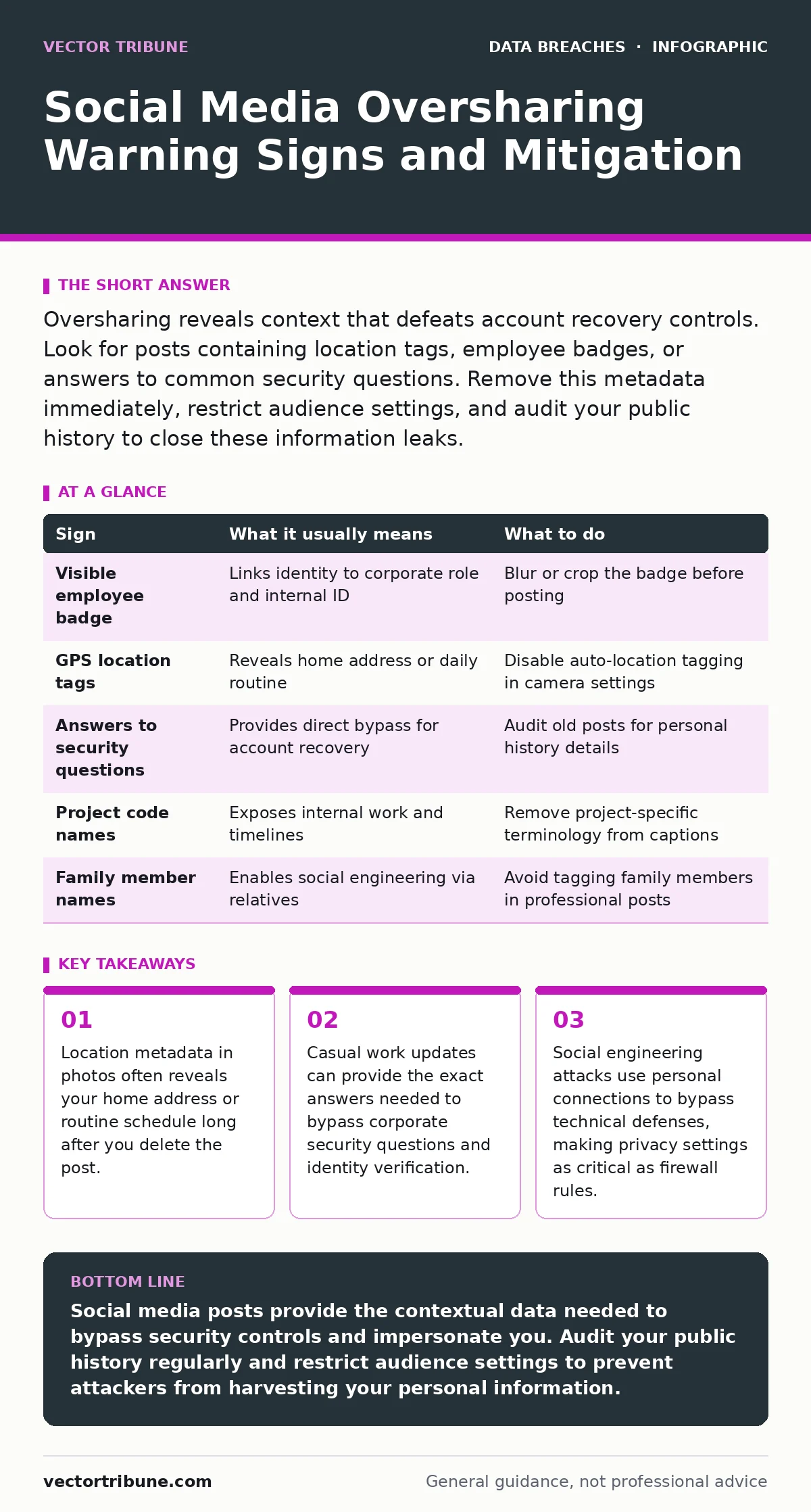
Use this table to assess common oversharing scenarios and apply immediate corrective actions.
| Sign | What it usually means | What to do |
|---|---|---|
| Visible employee badge | Links identity to corporate role and internal ID | Blur or crop the badge before posting |
| GPS location tags | Reveals home address or daily routine | Disable auto-location tagging in camera settings |
| Answers to security questions | Provides direct bypass for account recovery | Audit old posts for personal history details |
| Project code names | Exposes internal work and timelines | Remove project-specific terminology from captions |
| Family member names | Enables social engineering via relatives | Avoid tagging family members in professional posts |
Auditing Your Digital Footprint
You must treat your social media history as a persistent data store. Posts you made years ago remain searchable even if you have since changed your privacy settings. Search engines cache these pages, and attackers can access archived versions.
Start by searching your own name on major search engines. Look for old posts that contain personal details. Delete or restrict access to any post that reveals your home address, family members, or work details.
Check the privacy settings of each platform you use. Ensure that your friend list is not public. Public friend lists provide attackers with a map of your social connections, which they can use for further reconnaissance.
Integrating Privacy with Security Frameworks
Treating social media privacy as a security issue aligns with broader risk management strategies. When you consider the risks of data breaches, you see that leaked credentials are often paired with personal data scraped from social media.
This approach complements the principles found in ISO 27001, which emphasizes the protection of information assets. Your personal data is an asset that, if compromised, can lead to unauthorized access to corporate systems.
If you lose access to your accounts, the process of recovery can be complicated by oversharing. Refer to guidance on lost and stolen devices to understand how attackers use physical access combined with social data to bypass locks.
Preventing Insider Threats
Oversharing can inadvertently create an insider data theft vector. If you post sensitive work information, you are leaking data that could be valuable to competitors or malicious actors.
This is not about malicious intent. It is about negligence. By failing to redact sensitive information, you provide the data that an insider threat actor might seek.
To mitigate this, establish a personal policy for reviewing posts before publishing. Ask yourself: "If this post were read by a competitor, would it reveal anything valuable?" If the answer is yes, do not post it.
Key takeaways
- Location metadata in photos often reveals your home address or routine schedule long after you delete the post.
- Casual work updates can provide the exact answers needed to bypass corporate security questions and identity verification.
- Social engineering attacks use personal connections to bypass technical defenses, making privacy settings as critical as firewall rules.
Social media posts provide the contextual data needed to bypass security controls and impersonate you. Audit your public history regularly and restrict audience settings to prevent attackers from harvesting your personal information.
Frequently asked questions
How do I remove GPS data from photos before posting?
Most smartphones allow you to disable location services for the camera app. You can also use built-in photo editing tools to strip metadata before uploading.
Can attackers use social media to bypass two-factor authentication?
Yes, if they can reset your password using answers to security questions found in your posts, they may gain access before 2FA is triggered or use social engineering to bypass it.
Is it safe to post about my job on social media?
Only if you avoid mentioning specific projects, code, or internal processes. General statements about your industry are usually safe, but specific details are not.
What should I do if I see a colleague oversharing?
Politely remind them of the risks without shaming. Many people are unaware of the dangers. If the post contains sensitive company data, report it through your organization’s security channel.
How this guide was produced: written by the Vector Tribune editorial team with AI assistance, checked against the public references listed below, and reviewed when the facts change. See our editorial policy or report an error.