Detect SaaS Data Exposure: Signals, Blind Spots, and Detection
Most SaaS leaks occur through authorized integrations that behave normally, making them invisible to standard perimeter defenses and traditional audit logs.
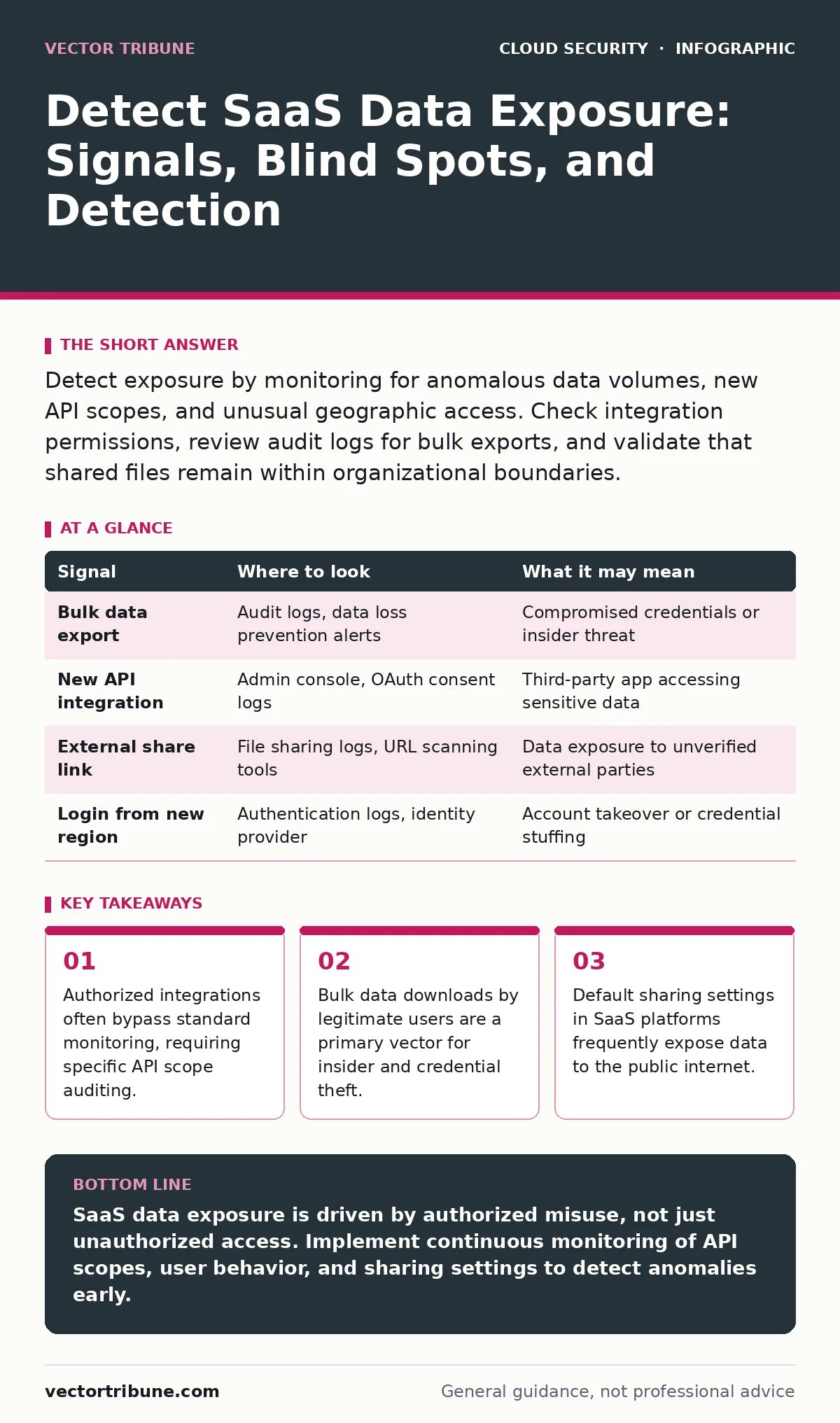
Detect exposure by monitoring for anomalous data volumes, new API scopes, and unusual geographic access. Check integration permissions, review audit logs for bulk exports, and validate that shared files remain within organizational boundaries.
The Illusion of Perimeter Security
You assume your data is safe because it lives inside a vendor’s walled garden. This assumption fails when the data moves. SaaS applications rarely keep data static. They move it between services, share it via links, and allow integrations to pull records. When you rely solely on network perimeter tools, you miss the traffic that happens inside the application layer.
The application programming interface (API) is the new network. It is the mechanism by which software components communicate. If you do not monitor API calls, you are blind to how data leaves the application. You must shift your detection logic from the network edge to the application identity layer.
Audit Logs and Behavioral Anomalies
Audit logs are the primary source of truth for SaaS activity. Most platforms generate these logs, but they are often noisy and difficult to parse. You need to look for deviations from baseline behavior, not just failed login attempts. A successful login followed by a massive data export is far more dangerous than a failed brute-force attack.
Imagine a user who normally downloads five files a day suddenly exports ten thousand records. This is a data exfiltration signal. It may indicate a compromised account or a malicious insider. You must establish a baseline for normal user activity. Without a baseline, you cannot distinguish between a busy employee and a data thief.
| Signal | Where to look | What it may mean |
|---|---|---|
| Bulk data export | Audit logs, data loss prevention alerts | Compromised credentials or insider threat |
| New API integration | Admin console, OAuth consent logs | Third-party app accessing sensitive data |
| External share link | File sharing logs, URL scanning tools | Data exposure to unverified external parties |
| Login from new region | Authentication logs, identity provider | Account takeover or credential stuffing |
Integration and API Scope Misconfigurations
SaaS applications rely on third-party integrations to function. These integrations use OAuth tokens to access data. The scope of these tokens defines what data the integration can read or write. A common mistake is granting broad scopes when only narrow access is needed.
Suppose a project management tool requests access to all customer email addresses in your CRM. It only needs the customer name and ticket ID. The extra scope creates an unnecessary attack surface. If that project management tool is compromised, the attacker gains access to your entire email database.
You must audit every integration’s permissions regularly. Look for integrations that have not been used in months. Revoke their tokens. Check for integrations that request "read all" or "admin" privileges. These are high-risk configurations. For deeper context on how these interfaces fail, see our guide on insecure cloud APIs.
Identity Provider and Access Tokens
Your identity provider (IdP) is the gatekeeper for SaaS access. It issues tokens that prove a user’s identity. If you do not monitor token issuance, you cannot detect when an attacker uses a stolen token. Short-lived tokens reduce the window of opportunity for attackers, but they do not stop replay attacks.
Look for tokens issued from unfamiliar devices or locations. Check for tokens that are used simultaneously from different geographic regions. This is a strong indicator of account compromise. You should also monitor for tokens that are used by service accounts. Service accounts often have higher privileges and are targeted by attackers.
File Sharing and Collaboration Boundaries
SaaS platforms make sharing easy. This convenience leads to accidental exposure. Users often share files with external parties without realizing the long-term implications. A link shared with a client may remain active long after the project ends.
You must monitor external sharing logs. Look for files shared with domains outside your organization. Check if these files are set to "anyone with the link" can view. This setting bypasses authentication entirely. Even if the link is not public, it can be guessed or leaked.
Imagine a developer sharing a code repository with a contractor. The contractor leaves the company, but the link remains active. The contractor can still access the code. You need a process to review and revoke external shares periodically. This is a manual task that requires discipline.
See also: Container Escape: Definition, Mechanics, and Mitigation Strategies
Common Blind Spots in Detection
Most security teams focus on authentication failures. This is a blind spot. Successful authentication with abnormal behavior is the real threat. You also often ignore data at rest within the SaaS platform. If an attacker gains access to the admin console, they can export all data without triggering network alerts.
Another blind spot is shadow IT. Employees use SaaS applications without IT approval. These apps are not monitored, and their data is not protected. You cannot detect exposure in systems you do not know exist. Discover these applications through DNS logs and proxy traffic.
Finally, do not ignore the vendor’s own security posture. If the vendor suffers a breach, your data is exposed regardless of your controls. You cannot control their security, but you can monitor for public disclosures and incident reports. For strategies on managing vendor risk, refer to multi-cloud security practices.
Tooling and Automation
You cannot monitor SaaS exposure manually at scale. You need tools that aggregate logs from multiple SaaS applications. Security information and event management (SIEM) systems can ingest these logs. Configure them to look for the anomalies described above.
Data loss prevention (DLP) tools can scan for sensitive data in SaaS applications. They can block or alert on unauthorized sharing. Identity and access management (IAM) platforms can automate token revocation and permission reviews. These tools reduce the manual effort required to detect exposure.
Continuous Monitoring and Review
Detection is not a one-time task. Threats evolve, and user behavior changes. You must continuously review your detection rules. Tune them to reduce false positives. False positives lead to alert fatigue, where real threats are ignored.
Regularly audit your SaaS configurations. Check for new integrations, changed permissions, and updated sharing settings. Involve business owners in this process. They understand their data flows and can identify risky configurations. This collaborative approach ensures that security does not hinder productivity.
For insights on securing the underlying infrastructure that supports these services, see our guide on infrastructure-as-code scanning.
Key takeaways
- Authorized integrations often bypass standard monitoring, requiring specific API scope auditing.
- Bulk data downloads by legitimate users are a primary vector for insider and credential theft.
- Default sharing settings in SaaS platforms frequently expose data to the public internet.
SaaS data exposure is driven by authorized misuse, not just unauthorized access. Implement continuous monitoring of API scopes, user behavior, and sharing settings to detect anomalies early.
Frequently asked questions
How do I detect if a SaaS integration is stealing data?
Monitor the integration’s API usage for unusual data volumes or access patterns. Revoke tokens for integrations that are inactive or have excessive permissions.
Can I prevent all SaaS data leaks?
No. You can reduce risk by enforcing least privilege, monitoring for anomalies, and educating users. Complete prevention is impossible due to human error and evolving threats.
How this guide was produced: written by the Vector Tribune editorial team with AI assistance, checked against the public references listed below, and reviewed when the facts change. See our editorial policy or report an error.